Here, at
Success Labs
, we like researching things without a real cause. Kinda like back when we were kids and took apart the family's radio just for fun...
Following are microscope shots of the various iDevices, whether these be iPhones, iPads, or Mac Books. This is a playful observation and not a real research. For further (and better) reading you can follow the links at the
bottom of this section
.
We've tried to keep the photos relatively aligned, but it's not very accurate. (We were using a chinese ordered 15$ hand-held digital microscope).
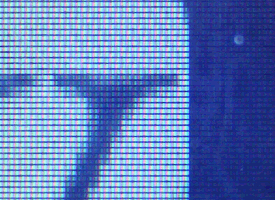
Following is the frame we are looking at, and then zooming on to the "interesting" level.
The frame we're looking at. Can you guess the application?
(About x50 magnification)
Zoomed in by about x250
First we compared the iPhone 4's Retina Display® to the old "normal" display of the iPhone 3Gs. Naturally this is what initiated the microscope test and interested us the most.
iPhone 4 Retina Display®
326 ppi
~x250 magnification
iPhone 3Gs "regular" display
163 ppi
same magnification (~x250)
The difference is outstanding. It's plain to see the amount of information in Retina Display® surpasses by far that of the old display (times 4 to be exact).
Also interesting are those gray lines in the iPhone 3Gs' display. We're assuming it's either the pixels control layer, or something to do with the Touch Screen mechanism. In any case, they are not visible in the Retina Display® screen, which provides even a better image.
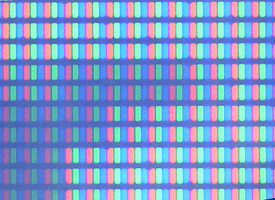
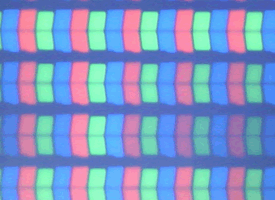
Finally, we witness for the first time the change of pixel shape. While the iPhone 3Gs had strict rectangles, the iPhone 4 has a slightly more complex and curved shape for the pixel. This turns even weirder with the iPad:
iPhone 4 Retina Display®
326 ppi
same magnification (~x250)
iPad 1 display
132 ppi
same magnification (~x250)
C
o
l
o
r
f
u
l
b
u
t
t
e
r
f
l
y
p
i
x
e
l
s
!
:)
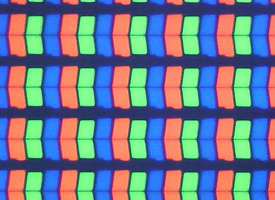
The shape of these pixels is truly intriguing. They differ in size, seem to be split in half, and have a small angle, as to overlap.
We can see the green is smaller than both red and blue. This might be related to the human eye being more sensitive to green, thus appliying some counter-compensation.
The pixels are also cut in half and they're shaped to have some overlap of their bounding boxes. This could cause less distinction of the individual pixels.
Now let's see how the iPad 1 and iPad 2 displays compare:
iPad 1 display
132 ppi
same magnification (~x250)
iPad 2 display
132 ppi
same magnification (~x250)
The pixels appear to identical. There is a strong distinction in contrast and brightness, though here we have to admint it might be a result of our measuring. With such magnifications, every movement caused enough pressure to the screen to change the field of depth, thus needing re-focus.
Update
: Our measurements have been a bit off. In subsequent measures we witnessed closer results between both devices, but still it seemed the iPad 2 was a bit more crisp.
Finally, let's see how the MacBook Pro compares to all this. While it is mobile, it's not a mobile device in the common sense, and is designed under different limitations:
iPhone 4 Retina Display®
326 ppi
same magnification (~x250)
MacBook Pro 13.3"
113 ppi
same magnification (~x250)
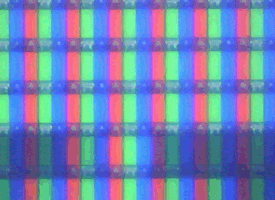
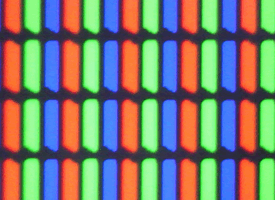
Closer to the iPad 2 display (above), the MacBook Pro presents the largest pixels among the other devices. Pixels are rectangular, but not completely.
The clarity is as of the iPad 2 (if our readings are accurate), and the intesity is the strongest among all screens. Makes sense as the MacBook has much more power available, and is intended for viewing at a greater distance.
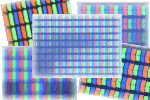
And that sums up what we've currently witnessed. We'll finish by placing all displays side by side for reader's reference:
(All images are of ~x250 magnification)
Utilizing polarized 3D glasses, we checked the polarity of the different displays. We knew LCD's to be completely polarized, and at first were reassured:
The MacBook was indeed polarized. Same with with the iPad:
But then the
surprise bit
- iPhone 4 Retina Display was showing a
different bi-polarized result
:
The iPhone 4 seemed to be polarized in 2 different distinct directions. Although in the movie it appears like a continuous rainbow of colors, that is mostly due to visual artifacts, as the camera is not aligned in resolution nor angle to the iPhone.
By playing around with the various angles, and later by more accurate testing, we are now assuming the red's are polarized differently than the blue's. When we will base and test our assumptions, we'll issue an update here.
This kind of behavior is what we were hoping to find. Thinking of utilizing Retina Display's double resolution for 3D vision somehow. Currently is does not appear to be really useful, as it does not add on the red-cyan 3D technology, but it was still exciting to find :)
That's it for this session, questions/remarks/comments are welcome below!







 Loading...
